McLeod LoadMaster automation

What G2 Logix automation handles

Each automation connects your McLeod LoadMaster data to the carrier back-office work your team does every day—broker communication, check calls and proof-of-delivery paperwork included. Turn them on one at a time.

Order entry

When a rate con comes in, G2 Logix reads it and builds the order in McLeod automatically, so nobody has to key it in.

What it replacesTyping each rate con into McLeod by hand.
Works withMcLeod LoadMaster

Broker updates

When a broker emails asking for status, G2 Logix looks up the load in McLeod, checks the truck’s GPS location, and replies with the current status.

What it replacesA dispatcher stopping to look up the load and type the same answer again.
Works withMcLeod LoadMaster, company-branded email; truck GPS

Check calls

Check-call status goes out to brokers from your load data, including replies to automated check-call emails from broker systems.

What it replacesManual check calls and status emails, load by load.
Works withMcLeod LoadMaster; truck GPS

Paperwork

When a broker asks for documents, the BOL, POD or lumper receipt attached to the load is sent back from your company-branded email.

What it replacesDigging through files and forwarding attachments by hand.
Works withMcLeod LoadMaster, company-branded email

Rate-con audit

The rate confirmation and the order in McLeod are compared against the agreed rate. Mismatches get flagged for your team.

What it replacesCatching a short rate con after the load is already delivered.
Works withMcLeod LoadMaster, DocumentPower

Late-load detection

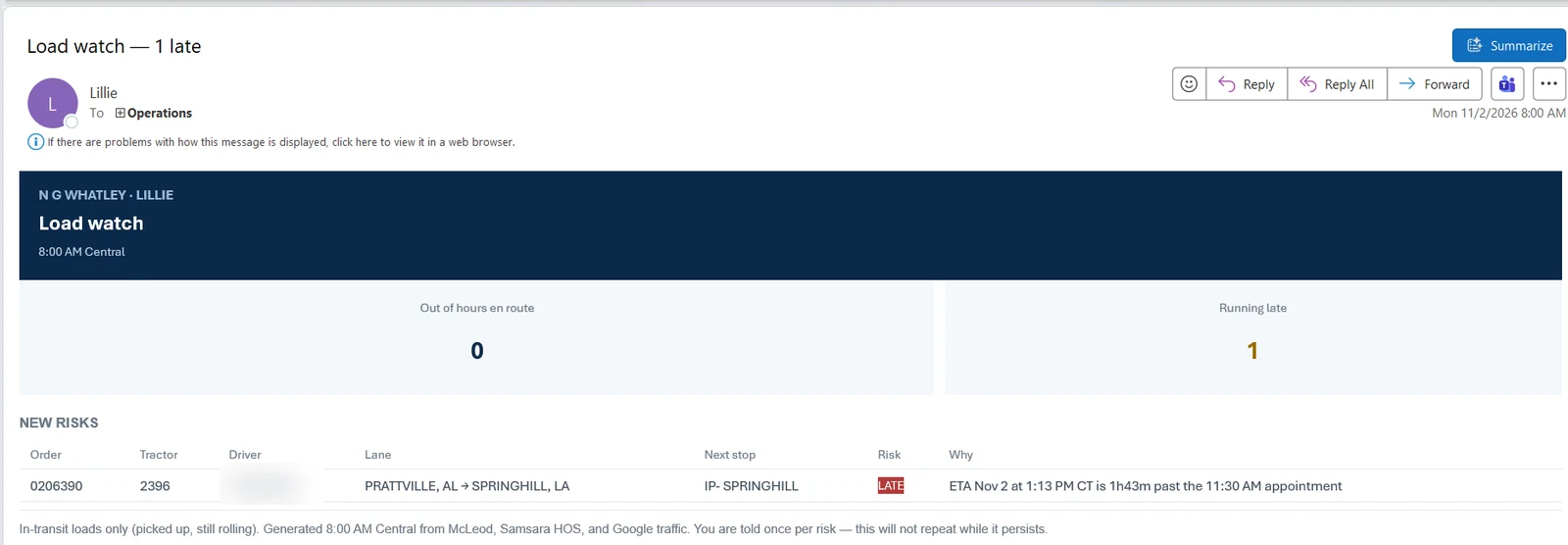
G2 Logix checks each in-transit load against its next appointment and flags the ones running late, with the reason, so someone acts before it's a problem.
What it replacesChecking loads one by one to see which ones will miss the appointment.
Works withMcLeod LoadMaster; truck GPS
Lillie's Load watch email to Operations, Monday 8:00 AM. Summary: 0 out of hours en route, 1 running late. New risks table: order 0206390, tractor 2396, driver name blurred, lane Prattville, AL to Springhill, LA, next stop IP-Springhill, flagged LATE because the ETA of 1:13 PM CT is 1 hour 43 minutes past the 11:30 AM appointment. Footnote: in-transit loads only, generated 8:00 AM Central from McLeod, Samsara HOS and Google traffic; you are told once per risk.
Lillie’s morning Load watch email: each in-transit load that’s running late, with the reason. You hear about a risk once, so it doesn’t repeat while it lasts. Tap the image to see it full size.

DVIR follow-up

DVIRs are watched. When an inspection is missing, the driver gets a reminder.

What it replacesChasing drivers for missing inspections after the fact.
Works withDVIR data

Driver messages

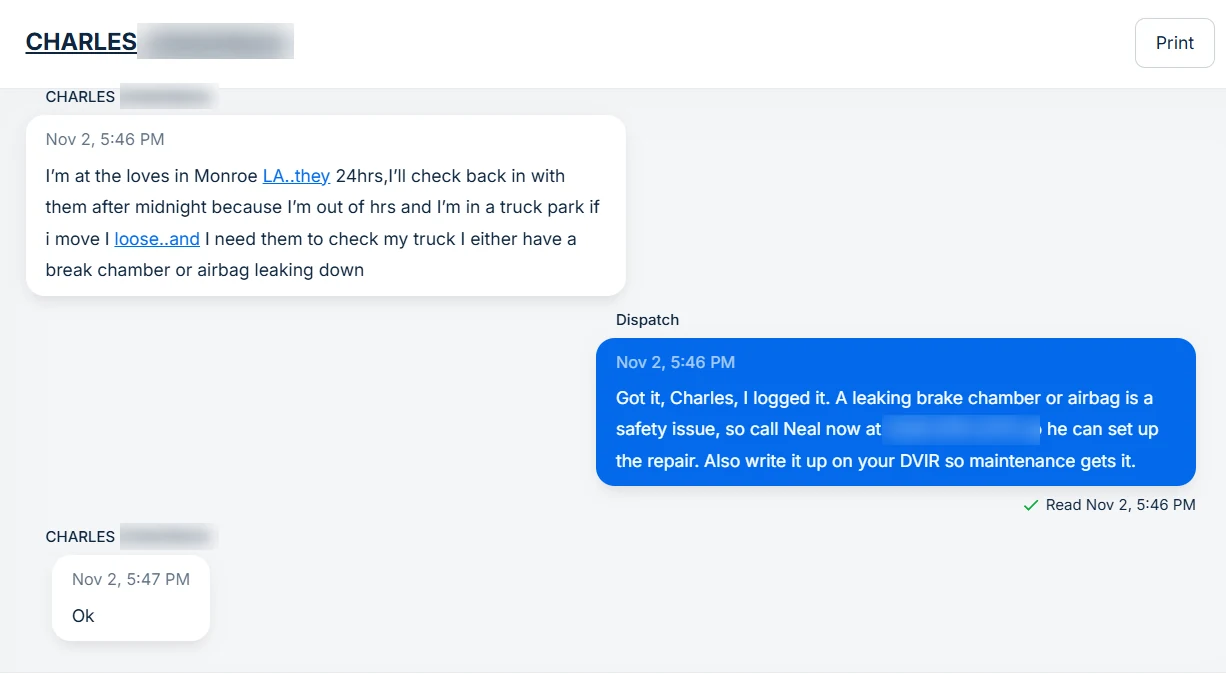
Lillie answers drivers by text: pickup numbers, delivery appointment times and pickup addresses, from the load in McLeod. When a driver says they’ve arrived or are empty, she logs it and tells them their next load and pickup time. Drivers also get their fuel-stop plan with gallons per stop, and reminders to certify their ELD logs.
What it replacesDrivers calling or texting dispatch for numbers, times and addresses that are already on the load.
Works withMcLeod LoadMaster, driver messaging
Samsara driver message thread, Nov 2. 5:46 PM, the driver, Charles (last name blurred): he is at the Love's in Monroe, LA, out of hours, and has either a brake chamber or airbag leaking down. 5:46 PM, Dispatch (Lillie): "Got it, Charles, I logged it. A leaking brake chamber or airbag is a safety issue, so call Neal now at (number blurred) so he can set up the repair. Also write it up on your DVIR so maintenance gets it." 5:47 PM, the driver: "Ok".
A driver texts about a possible brake leak. Lillie logs it, tells him it’s a safety issue, who to call for the repair, and to write it up on his DVIR. Tap the image to see it full size.

See Lillie texting drivers →

Load board search

G2 Logix connects to the DAT, C.H. Robinson and Arrive Logistics load boards through their APIs. For a truck coming empty, it checks your own open loads in McLeod first, then searches all three boards near where and when the truck frees up, and ranks the options by what they pay after deadhead. It finds loads; it doesn’t book them or agree to a rate. Your dispatcher decides.

What it replacesSearching three load boards by hand, truck by truck, to find the next load.
Works withMcLeod LoadMaster, plus API access to each load board

Bank feed matching

Connect your business bank account. G2 Logix pulls in posted transactions, matches deposits to open invoices and withdrawals to open bills or checks in McLeod, and flags anything nothing explains. Your team approves each match before it’s keyed into McLeod.

What it replacesManual uploads of bank files and matching bank lines to McLeod by hand at the end of the day or month.
Works withMcLeod LoadMaster, a connected business bank account

Looking for fuel? See Intelligent Fuel Manager →

Requirements vary by feature. Every feature needs McLeod LoadMaster with API access; GPS-based updates, driver messages and DVIR follow-up need a supported GPS and driver-messaging connection (we confirm yours on the demo call).

See it working on real loads.

Book a demo and we’ll walk through G2 Logix on McLeod.

Book a demo